To streamline the release process, Amore's CLI offers a command to be used with Xcode' archive post-actions, which will automatically handle every part of the release process after you archived your project.
This includes:
- Exporting the archive
- Codesigning your executable
- Creating an installer DMG (optional)
- Notarizing your app
- Signing your app for the Sparkle updater
- Creating a new
appcast.xml - Uploading your app binary
Video
In case you prefer to watch a video, here's this guide as a video (3:19).
Requirements
To use the Amore's Xcode post-archive action you first need to setup a Codesign Identity and Notarization Keychain Profile in the Codesigning settings.
You also need to have the amore CLI installed.
Setup
All you need to do to set this up is adding the following command line instructions to your archive post-actions run script:
amore post-archiveYou get there by clicking by Menu Bar -> Product -> Scheme -> Edit Scheme -> Archive -> Post-actions.
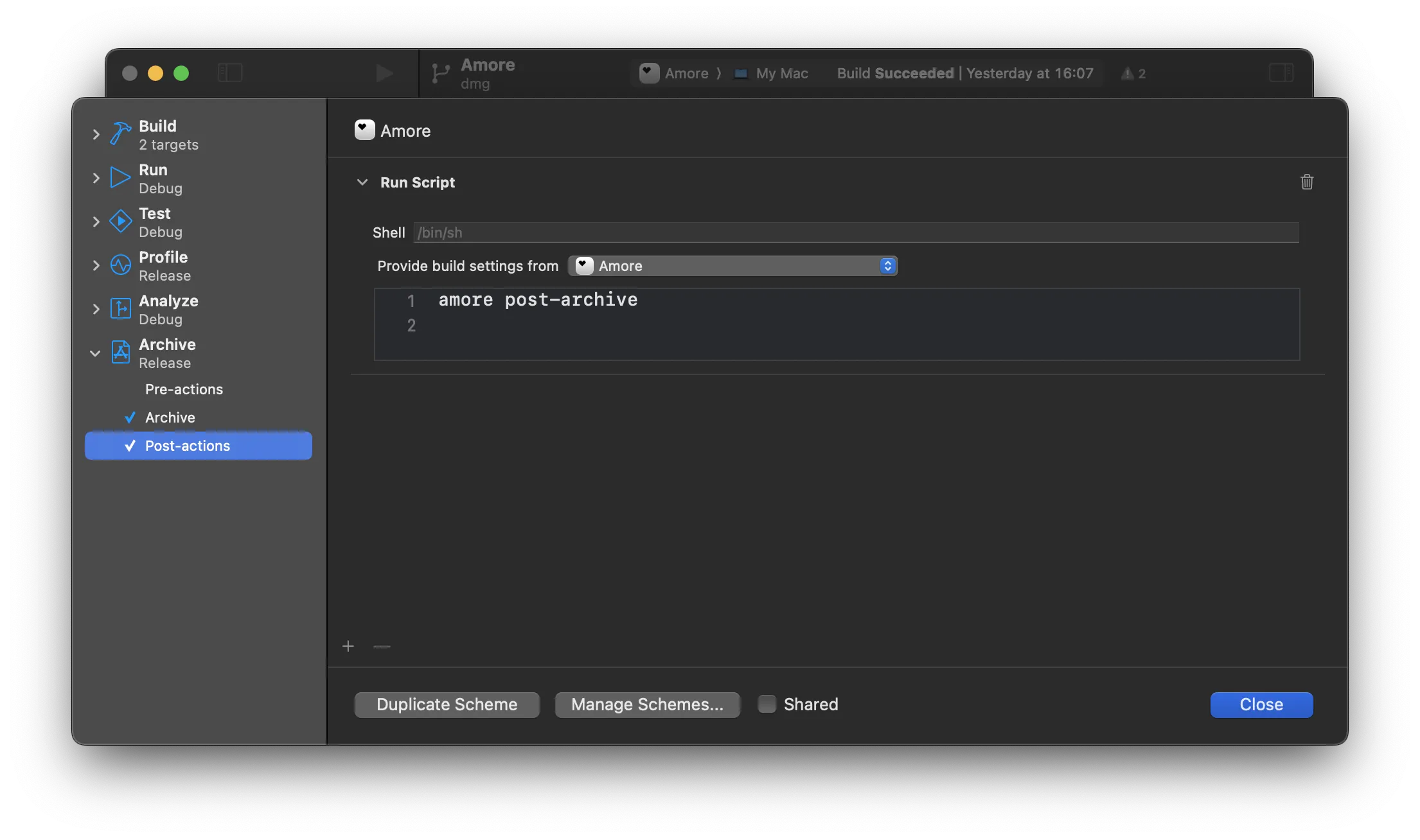
Now, after you successfully archive your app for distribution, Amore will take over and open the Amore desktop app, which after your confirmation will take care of all the previously mentioned steps for you.